Within Master Chart Filter the 'Delete Code' function will delete the tagged codes from buildings if the code has not been used for two years. It is recommended this step is run first, which will reduce the number of account codes in the local buildings to be checked during an Account Compare.
Only account codes in the Master Chart and Base Building can be deleted, except locally used codes that do not exist in the Master Chart.
Strata Cash Management Periodic Payments
If there are any StrataCash Periodic Payments set up that do not result in activity against the Creditor Code – i.e. transactions / invoices to the creditor code, the account will be deleted from the building and potentially causing payments to fail or be delayed if not re-added back to the local building. In these instances the Period Payment will need to be corrected.

- From the building selector, select Master Chart at the bottom of the screen
- Search or select Master Chart Filter.
- Tag required buildings (usually all – ctrl + A)
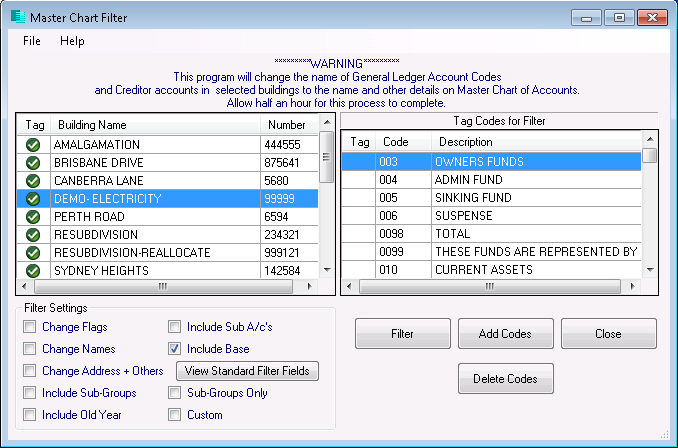
- Tick the Include Base box if you wish to delete codes from the Base Building as well.
- Click Delete Codes.
- If you ticked the Include Base box, click 'Yes' to confirm you are using the Base Building.
- Tag all codes (Ctrl + A) then un-tag any account codes that you do not want to delete.
- Some system codes are not able to be deleted and will be de-selected automatically as per below.
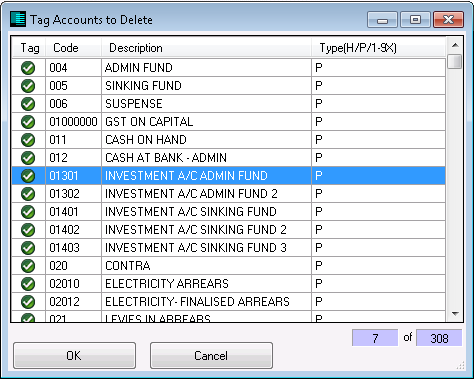
- Some system codes are not able to be deleted and will be de-selected automatically as per below.
- A list of accounts required by the system will be displayed, these account codes will not be deleted, click on OK.
- When prompted ‘Are you sure you want to delete the selected accounts?’ select Yes.
- The list of accounts for deletion will come to screen, select OK to proceed.
A log displaying the deleted account codes can be viewed or printed by selecting File > View Log. It is recommended the log is added to history once viewed or printed.
If any accounts have TaskMax activity that is less than two years old, the below message will appear. Select Yes if you wish to delete the account or No to retain the account. You will then be prompted whether to apply the same answer to all instances of this message.

